WordPress Website Optimization: Best Practices for Speed, UX, and SEO

WordPress Website Optimization: Best Practices for Speed, UX, and SEO

Most WordPress site owners find out their site is slow the hard way, through a dip in Search Console traffic or a client complaint about a page that takes forever to load on mobile. By the time that happens, the problem is rarely just one thing. It’s a theme carrying features nobody uses, two caching plugins fighting each other, and images uploaded straight from a phone camera. Speed, user experience, and SEO on WordPress are really the same conversation now, because Google measures the experience directly instead of guessing at it from crawl data alone.

Why WordPress Sites Slow Down in the First Place

WordPress itself is not slow. The platform builds a page by running PHP, querying the database, and assembling HTML on the fly, unless something is caching that output ahead of time. What drags a site down is almost always one of four things: hosting that can’t handle the traffic and plugin load, a theme that ships far more CSS and JavaScript than the page needs, media files that were never compressed or resized, and a database bloated with old revisions and expired transients. Fix those four and most of the “my site is slow” problem disappears before a single optimization plugin gets involved.

What Core Web Vitals Actually Measure

Google evaluates real visitor sessions through the Chrome User Experience Report, not lab tests, and scores three metrics at the 75th percentile. Largest Contentful Paint measures how quickly the biggest visible element renders, and it should land under 2.5 seconds. Interaction to Next Paint measures how fast the page responds to clicks, taps, and keystrokes, with a good score under 200 milliseconds. Cumulative Layout Shift measures how much content jumps around while the page loads, ideally staying under 0.1. INP replaced First Input Delay as the responsiveness metric back in 2024 and is stricter, since it looks at every interaction on the page rather than just the first one. These numbers act as a tie-breaker in rankings, but their bigger effect is on conversions. A page that stutters when someone taps “Add to Cart” loses that sale whether or not Google notices.

Start With Hosting, Not Plugins

Server response time sets the ceiling for everything else. No amount of caching or minification fixes a shared hosting account that takes a second and a half just to hand over the first byte. Before adding another plugin, check Time to First Byte in PageSpeed Insights. If it sits consistently above 600 milliseconds, the fix is a better hosting environment, meaning managed WordPress hosting, enough PHP workers, and a current PHP version, not another layer of software trying to compensate for a slow server.

SSL is worth checking here too. A missing or misconfigured certificate blocks HTTP/2, which lets browsers request multiple assets over a single connection instead of queuing them one by one, so SSL’s role in WordPress hosting goes well beyond encryption, quietly shaping load speed as well as security.

Caching Does Most of the Heavy Lifting

Once hosting is solid, page caching is the single highest-impact change available. It stores the fully built HTML so WordPress doesn’t rebuild the page from PHP and database queries on every visit, and it typically cuts load time more than any other single step. Layer it properly: page caching for the HTML itself, browser caching so repeat visitors don’t re-download static assets, object caching such as Redis for sites with heavy dynamic content or WooCommerce, and a CDN so assets are served from a location close to the visitor. Run only one page caching plugin at a time. Two active together create conflicting cache files and stale content that’s genuinely painful to debug later.

Fix Images Before They Fix Your LCP Score for You

Images are the most common cause of a failing LCP score, usually because the hero or featured image is oversized, uncompressed, or loading from a slow source. WordPress has converted uploads to WebP automatically since version 6.1 when the server supports it, and WebP files typically run 25 to 35 percent smaller than an equivalent JPEG at similar visual quality. AVIF compresses further still but takes longer to encode, so WebP remains the sensible default for most sites right now. Set explicit width and height attributes on every image so the browser reserves space before the file loads, which is one of the simplest ways to avoid layout shift. Lazy load anything below the fold, but never the image that is your LCP element. That one needs to load immediately, not on a delay.

CSS, JavaScript, and the INP Problem

INP is the metric most sites fail, and it’s harder to fix than the others because there’s no single lever to pull. It comes down to how much JavaScript the browser has to parse and execute before it can respond to a click. Defer scripts that aren’t needed to render the initial layout, strip out CSS rules that don’t apply to the current page (most themes load a full stylesheet when a page only uses a fraction of it), and generate critical CSS so the visible portion of the page can paint before the rest of the stylesheet arrives. Be selective about what gets deferred, though. Anything the page needs to build its initial layout will cause a layout shift if it’s pushed back, which just trades a CLS problem for an INP fix.

Fonts and the Small Details That Add Up

Web fonts block rendering if they aren’t handled carefully. Preload the fonts used above the fold, set font-display to swap so text stays visible in a fallback font while the custom font loads, and limit how many font weights and styles the site actually uses. Three font files is a reasonable ceiling for most sites, and ten is a common, avoidable drag on performance.

Don’t Forget the Database

A WordPress database accumulates post revisions, expired transients, and spam comments that nobody remembers to clear out. This doesn’t usually break a site outright, but it slows down every query the site runs, which eventually shows up in Time to First Byte and INP alike. Cleaning it periodically, whether through a plugin or a direct query, is a low-effort task that pays off more than the five minutes it takes would suggest.

Measure, Prioritize, Repeat

Use PageSpeed Insights for field data from CrUX and lab data from Lighthouse together, since they answer different questions. Field data shows what real visitors experienced. Lab data shows why. Search Console’s Core Web Vitals report groups failing pages by template, which is usually more useful than checking individual URLs one at a time, since fixing one shared template fixes every page built from it.

When to Bring In Outside Help

Most of what’s covered here can be handled by a site owner with some patience and a staging environment. But a site that’s accumulated years of theme changes, plugin sprawl, and inconsistent maintenance sometimes needs a structural audit rather than another round of settings tweaks.

That’s usually the point where handing the technical side to a web design & development team makes more sense than chasing it alone, since a fresh set of eyes tends to catch what years of small changes have quietly buried.

The Short List

If time is limited, the order of operations that moves the needle fastest is: fix hosting and TTFB first, add page and browser caching second, compress and correctly size images third, then work through CSS and JavaScript for INP. Everything else, fonts, database cleanup, ongoing monitoring, compounds on top of that foundation rather than replacing it. A WordPress site that’s fast, stable, and responsive isn’t the result of one plugin. It’s the result of treating speed as infrastructure rather than an afterthought.

Accessibility in Web Design: How to Build Inclusive Websites That Everyone Can Use

A good website should not only look impressive. It should also be easy for people to understand, navigate, read, and use. That sounds simple, but many websites still create barriers for visitors without meaning to.

Some users may have low vision. Some may rely on screen readers. Some may use only a keyboard. Others may be older, temporarily injured, using a mobile phone outdoors, dealing with a slow connection, or simply trying to complete a task quickly while distracted.

That is why accessibility in web design matters. It is not just about meeting technical guidelines or avoiding legal problems. It is about creating websites that work better for real people in real situations.

When accessibility is treated as part of the design process from the beginning, the result is usually a clearer, faster, more usable website for everyone.

Accessibility Is About Real Users

Many people think accessibility only applies to a small group of users with permanent disabilities. In reality, accessible design helps a much wider audience.

For example, captions help people who are deaf or hard of hearing, but they also help someone watching a video in a noisy place. High contrast helps users with low vision, but it also helps anyone reading a screen in bright sunlight. Clear form labels help people using assistive technology, but they also reduce confusion for every visitor.

Accessible design is really about removing friction. It asks a simple question: can different people use this website comfortably, regardless of their device, ability, environment, or level of technical confidence?

That mindset leads to better design decisions.

Start With Clear Structure

One of the most important parts of accessibility is structure. A website should be organized in a way that makes sense visually and technically.

Headings should follow a logical order. The main title should be clear. Sections should be grouped properly. Menus should be easy to understand. Buttons and links should describe what they do.

This helps all visitors scan the page, but it is especially important for people using screen readers. A screen reader can help users jump between headings, links, and sections, but only if the page is structured correctly.

For example, a service page should not jump randomly from a main heading to small decorative headings and then back to another major section without order. A blog post should not use headings only because they look good visually. Headings should describe the content below them.

Good structure makes the website easier to understand, easier to navigate, and easier for search engines to interpret as well.

Use Readable Text and Strong Contrast

Text is one of the most important parts of any website. If people cannot read the content comfortably, the design has failed, no matter how attractive the layout looks.

Readable typography includes font size, line spacing, paragraph length, color contrast, and spacing between sections. Small gray text on a white background may look elegant in a mockup, but it can be difficult to read for many users. Thin fonts may look stylish but can create problems on mobile screens.

Strong contrast between text and background is especially important. Visitors should not have to strain to read basic information. Buttons should also stand out clearly from the surrounding design.

Accessibility does not mean every website must look plain. It simply means visual choices should support usability. A brand can still have personality, color, and style while remaining readable.

Make Navigation Simple

Navigation is one of the first places where accessibility problems appear. If a visitor cannot find what they need, the website becomes frustrating.

Menus should be clear, predictable, and easy to use. Too many menu items can overwhelm users. Vague labels such as “Solutions” or “Resources” may work in some cases, but they should be used carefully. If visitors cannot tell what a menu item means, they may not click it.

Accessible navigation should also work with a keyboard. Some users cannot use a mouse and instead move through the page using the Tab key. If a menu, dropdown, form, or button cannot be reached by keyboard, that creates a serious barrier.

A visible focus state is also important. When a user tabs through a page, they should be able to see where they are. Removing focus outlines just because they look unattractive is a common design mistake.

Design Forms With Care

Forms are often where users take important actions. They contact a business, request a quote, subscribe, register, book an appointment, or make a purchase. If forms are difficult to use, the website may lose enquiries and conversions.

Accessible forms should have clear labels, helpful instructions, and useful error messages. A placeholder inside a field is not enough because it can disappear once the user starts typing. Labels should remain visible or clearly associated with each field.

Error messages should explain what went wrong and how to fix it. For example, “Invalid input” is not very helpful. “Please enter your phone number using only numbers” is much better.

Forms should also avoid asking for unnecessary information. Long forms can discourage users, especially on mobile devices. The easier the form is to complete, the more likely people are to use it.

Write Link Text That Makes Sense

Links should be descriptive. A visitor should understand where a link will take them without needing to read the entire surrounding paragraph.

Generic link text such as “click here” or “read more” is not ideal, especially when repeated many times on the same page. It gives very little context to people using screen readers or scanning quickly.

Better link text describes the destination. For example, “view our pricing plans,” “download the accessibility checklist,” or “read our website redesign guide” is more useful than “click here.”

This small habit improves accessibility, usability, and content clarity at the same time.

Think Beyond Visual Design

Many accessibility issues happen when a website is designed only for how it looks on a large desktop screen. But users interact with websites in many different ways.

Some visitors zoom in. Some use voice commands. Some use screen readers. Some browse from a phone. Some have color blindness. Some are not fluent in the language. Some have cognitive challenges that make complex layouts harder to follow.

This is why businesses get better long-term results from websites designed around real user needs rather than designs that only look polished in a presentation. A website should be planned around clarity, comfort, and practical user journeys.

When design decisions are made with real users in mind, accessibility becomes a natural part of the process rather than a last-minute fix.

Use Images Responsibly

Images can make a website more engaging, but they should not create barriers.

Important images should include alternative text that explains their purpose. This helps users who cannot see the image understand what it communicates. However, decorative images do not need long descriptions. The goal is not to describe every pixel, but to provide useful context.

For example, if an image shows a company’s team, the alt text might say, “Team members at the company office.” If an image is purely decorative, it can be handled in a way that screen readers skip it.

Avoid placing important text inside images whenever possible. If the text is part of the image, it may not be readable by assistive technology, and it may scale poorly on mobile devices.

Make Video and Audio Content Accessible

If a website uses video or audio, accessibility should be considered there too.

Videos should include captions when speech is important. Captions help people who are deaf or hard of hearing, but they also help users who cannot listen with sound. If the video contains important visual information, a transcript or written summary can also be useful.

Audio content should include transcripts where possible. This helps people who cannot hear the audio, but it also helps users who prefer reading or want to quickly find a specific point.

Media should also avoid autoplaying with sound. Unexpected audio can be disruptive and confusing, especially for screen reader users.

Keep Motion Under Control

Animations can make a website feel modern, but too much motion can harm accessibility and usability.

Some users experience discomfort from excessive movement. Others may find animations distracting. Large animated sections, fast-moving sliders, parallax effects, and auto-playing carousels can make it harder to focus on the content.

Motion should have a purpose. It can guide attention, show progress, or make an interaction feel smoother. But if an animation only exists to impress, it may not be worth the cost.

A good accessibility practice is to respect users who prefer reduced motion. Websites can be designed to limit animations for people who have selected that setting on their device.

Accessibility Supports Better Mobile UX

Mobile accessibility is especially important because small screens already create limitations. Text, buttons, menus, and forms need to be easy to use with one hand, on different screen sizes, and sometimes in imperfect conditions.

Buttons should be large enough to tap. Links should not be placed too close together. Text should be readable without zooming. Menus should not be confusing. Popups should not cover the entire screen or become impossible to close.

A mobile-friendly website is not automatically accessible, but good mobile UX and accessibility often support each other. Both are about making the experience easier for the user.

Test With Real People and Real Tools

Accessibility should not be based only on assumptions. Testing is important.

Automated tools can help identify issues such as missing alt text, low contrast, heading problems, or form label errors. However, automated testing cannot catch everything. A website may technically pass some checks and still feel confusing to real users.

Manual testing is also valuable. Try navigating the website using only a keyboard. Increase text size and see if the layout still works. Check pages on a phone. Ask someone unfamiliar with the website to complete a basic task.

The goal is not perfection on the first attempt. The goal is progress and awareness.

Accessibility Can Decline Over Time

A website may launch with good accessibility, but that does not mean it will stay that way forever.

New pages may be added without proper headings. Images may be uploaded without alt text. Plugins may change form behavior. Theme updates may affect contrast or layout. New popups, sliders, or third-party tools may create usability problems.

This is especially true for WordPress websites, where content, plugins, themes, and settings often change over time. Accessibility should be part of ongoing website care, not just the initial design project.

Having ongoing care that keeps WordPress websites usable and reliable can help website owners catch problems before they become bigger issues. Regular updates, backups, testing, and maintenance all support a healthier user experience.

Accessibility Is Good Business

Inclusive websites are not just better for users. They are better for business.

An accessible website can reach more people, reduce frustration, improve trust, support SEO, increase conversions, and create a more professional brand experience. It also shows that the business cares about how people interact with its digital presence.

Many accessibility improvements are not complicated. Clear text, strong contrast, simple navigation, descriptive links, proper headings, usable forms, and mobile-friendly layouts can make a big difference.

The most important step is to stop thinking of accessibility as an extra feature. It should be part of good web design from the beginning.

Final Thoughts

Accessibility in web design is about building websites that more people can use with confidence. It is about clarity, structure, readability, navigation, performance, and thoughtful interaction.

A truly inclusive website does not make visitors struggle to understand content or complete simple tasks. It removes unnecessary barriers and gives users a smoother path to the information or action they need.

In the end, accessible design is not separate from good design. It is good design. It helps businesses serve more users, communicate more clearly, and create better digital experiences for everyone.

Why Three Unusual Deployments Made AI Live Chat PRO Stand Out in Customer Service, B2B Sales and WooCommerce

Why Three Unusual Deployments Made AI Live Chat PRO Stand Out in Customer Service, B2B Sales and WooCommerce

The first serious wave of WordPress AI chatbot plugins created a strange problem for businesses: almost every product could talk, but very few could reliably answer from the business itself. 

That distinction matters. A visitor asking a tourism board about transport options, a business customer asking a bank about a commercial service, and a shopper trying to find a luxury watch are not asking for a generic AI conversation. 

This video shows you why AI Live Chat PRO is a serious contender:

https://www.youtube.com/watch?v=BmqNMiMg9x0&t=4s

They are asking the organization to make its own information easier to use. Our quest for the best plugin started a few years ago and it took a twist:

This is exactly the context in which AI Live Chat PRO (developed by Adriaan Brits from Sitetrail) deserves closer evaluation. Across three real deployments — a European tourism board, a bank, and a luxury USA WooCommerce retailer — the software produced notably different but commercially meaningful results. The tourism board adopted it partly for GDPR reasons and reported that 95% of user feedback collected in the interface was positive. The bank used it in a B2B sales environment and reported a 40% reduction in sales headcount while increasing revenue. The luxury watch retailer used it to help shoppers navigate thousands of products, making paid traffic more effective by shortening the path from search click to relevant product.

Those are very different outcomes. The common thread is architecture.

AI Live Chat PRO is not simply another chat bubble attached to a large language model. It is a WordPress-native AI sales and support assistant that retrieves information from the organization’s own site before generating an answer. For companies comparing an AI chatbot for WordPress, a WordPress AI chatbot plugin, or a ChatGPT WordPress plugin, this distinction is now central. The question is no longer only “which model is connected?” The more important question is: “what does the model know, where did that knowledge come from, and can the answer be trusted?”

The Tourism Board: Customer Service Without Losing Control of Data

The tourism board deployment is useful because it was not primarily a sales case. It was a public-facing customer service case.

Tourism websites receive a high volume of repetitive questions. Visitors ask about transport, attractions, accessibility, opening hours, seasonal activities, public facilities, events, weather-dependent options, and local regulations. Much of this information already exists on the website, but visitors often cannot find it quickly. Traditional navigation assumes people know which page to open. Many do not.

A WordPress customer support chatbot can help only if it understands the organization’s own published content. A generic chatbot may produce polite answers, but politeness is not enough when the visitor needs official guidance. The tourism board needed an assistant that could answer from its own pages and policies, while still fitting European data governance expectations.

That is where AI Live Chat PRO’s WordPress-native structure became important. The plugin runs inside the customer’s WordPress environment and builds a managed knowledge base from the site’s content. For organizations evaluating a GDPR chatbot or a self hosted AI chatbot WordPress setup, that is a meaningful difference from hosted systems where knowledge, transcripts and user data may be routed through another SaaS platform.

The tourism board’s reported result — 95% positive user feedback inside the interface — should be read in that operational context. Visitors were not rating an AI novelty. They were rating whether they received useful answers quickly. In tourism, speed and confidence matter. A person planning a trip may not want to search through ten pages to find a transport rule or attraction detail. If the assistant gives a grounded answer from the official website, satisfaction rises because the site becomes easier to use.

That is the first lesson from the deployment: for customer service, AI is valuable when it reduces the distance between the visitor and the institution’s own verified information.

The Bank: B2B Sales Automation Without Treating Every Lead the Same

The banking deployment tested a different assumption.

In B2B sales, the problem is not merely answering questions. It is deciding which conversations require human attention and which can be handled through structured information delivery.

Banks receive many early-stage enquiries from businesses that are not yet ready for a sales meeting. Some prospects need basic explanations. Some need to understand eligibility. Others are comparing services. A human sales team can spend a large amount of time answering questions that are important but repetitive.

The bank used AI Live Chat PRO to absorb a substantial portion of those early interactions. The reported outcome was a 40% reduction in sales headcount while revenue increased.

This is the kind of claim that should not be reduced to “AI replaced people.” A more accurate interpretation is that the bank shifted human capacity toward higher-value conversations. A strong B2B sales assistant does not need to close every deal alone. It needs to clarify intent, answer from reliable material, keep the prospect engaged, and escalate when the conversation becomes specific enough to justify human involvement.

That is why a WordPress support chatbot used in B2B sales must behave differently from a simple live chat plugin WordPress site owners might install for basic messaging. The value is not the chat window. The value is the knowledge retrieval layer behind it.

AI Live Chat PRO’s architecture is designed around that retrieval layer. It can ingest WordPress pages, landing pages and business content into a knowledge base, retrieve relevant material on each turn, and generate an answer from that context. In a banking environment, this matters because the assistant must not improvise. It must answer from approved content, explain services clearly, and avoid misleading the prospect.

For companies evaluating an OpenAI chatbot WordPress setup or GPT chatbot WordPress implementation, the bank case highlights an important point: model access alone is not a business system. Connecting a site to OpenAI may produce fluent answers, but fluency does not automatically create sales efficiency. The commercial value comes from controlling the information the model uses, maintaining continuity across a conversation, and knowing when to hand over to a human.

The bank’s result suggests that, in high-volume B2B settings, the right AI chat system can materially change the economics of inbound sales. Not because it makes every salesperson unnecessary, but because it reduces the number of conversations that require a salesperson in the first place.

The Luxury Watch Store: WooCommerce Search Becomes a Conversation

The luxury watch store is perhaps the clearest ecommerce case.

Large WooCommerce stores often suffer from a paradox of choice. A catalogue with thousands of watches may be commercially strong, but it can become difficult for shoppers to navigate. Filters help, but only when the visitor already knows which filters matter. Many customers do not think in database fields. They think in intent.

A customer might want a gift for a collector, a dress watch under a certain budget, a steel sports watch with a blue dial, or a specific brand alternative. Traditional category pages force that customer to translate intent into filters. A WooCommerce AI chatbot changes the interaction by letting the shopper describe what they want in ordinary language.

This is where an AI chatbot for WooCommerce becomes more than a support tool. It becomes a guided discovery layer over the catalogue.

The watch retailer reported that customers found suitable watches faster in a busy category with thousands of products. That speed had a second-order effect: PPC traffic became more effective. When paid visitors arrived from Google Ads, the chatbot helped them move from a broad landing page to relevant products faster than navigation alone.

That matters because ecommerce advertising is not won only inside the ad account. A campaign can have acceptable CPC and still fail if the post-click experience is too slow. For luxury retail, this problem is amplified. The shopper may be interested, but if the catalogue feels overwhelming, the click is wasted.

A WooCommerce chatbot plugin that understands products, pricing and categories can therefore improve conversion economics without changing the ads themselves. It helps the visitor make sense of the inventory.

AI Live Chat PRO is built specifically for this type of environment. Its technical specification describes WooCommerce-aware knowledge ingestion, including product facts such as titles, prices and permalinks. It also supports mixed content, meaning structured products and unstructured landing pages can exist in the same knowledge base. That is important for stores where buying decisions are influenced not only by product data, but also by guides, brand pages, FAQs, warranty policies and campaign landing pages.

For a retailer comparing a WooCommerce chatbot, WooCommerce AI chatbot, or WooCommerce chatbot plugin, the key question is whether the system merely chats or whether it can accurately retrieve from the store’s own catalogue. In the watch case, the latter mattered.

Why Retrieval Beats Generic Chat

The phrase “AI chatbot” is now too broad to be useful.

A simple chatbot can answer general questions. A stronger WordPress AI chatbot can answer from the site. A serious WordPress chatbot plugin for commerce or B2B sales must do something harder: retrieve the right information from a changing business environment before the model responds.

AI Live Chat PRO’s design is built around hybrid retrieval. In plain English, that means it does not rely on only one method to find relevant content. It uses semantic retrieval to understand meaning and keyword retrieval to preserve exact matches where needed. It also searches across the knowledge base on every turn, rather than locking itself too tightly to one previously mentioned product or page.

That matters in real conversations.

A visitor might begin by asking about one service, then pivot to another. A shopper might ask about one product type, then change budget or style. A business prospect might start with a general question, then move into pricing or eligibility. If the chatbot gets stuck on the first topic, the conversation becomes frustrating.

This is one reason AI Live Chat PRO should not be evaluated as merely another live chat plugin WordPress users can add to a site. A traditional WordPress live chat plugin connects a visitor to a person or captures a message. AI Live Chat PRO attempts to answer before a human is needed, using the organization’s own knowledge as the source.

That is a different category.

The Model Is Not the Whole Product

Many buyers searching for a ChatGPT WordPress plugin assume that ChatGPT itself is the product. That is understandable but incomplete.

The model is only the language engine. The business outcome depends on what context the model receives.

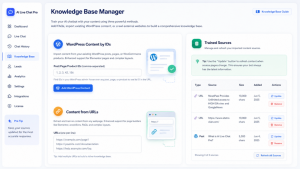
AI Live Chat PRO supports OpenAI and Grok, giving operators choice at the provider layer. But its differentiator is not simply that it can connect to a model. Its differentiator is the system around the model: content sync, retrieval, verified URL grounding, WooCommerce product facts, conversation continuity, and background indexing. Think about it: you click on a sync button, and it automatically connects to your ENTIRE Woocommerce store and landing pages, and indexes it without any manual work required – and then it adds the knowledge base for RAG vector creation, all with one click. That saves hundreds of hours. 

This distinction is important because many failures in AI chat do not come from weak language models. They come from weak grounding. A powerful model can still hallucinate a link, misquote a price, misunderstand a product, or answer from outdated assumptions if the system does not supply current verified context.

For businesses comparing AI Engine alternative options, Tidio alternative options, or any AI chat plugin for WordPress, this is the practical evaluation standard: can the assistant answer from the business’s own material accurately enough to affect operations?

In the three deployments examined here, the answer appears to be yes.

The tourism board improved visitor satisfaction because users received official answers faster. The bank improved sales efficiency because repetitive early-stage conversations could be handled without immediate human involvement. The luxury watch retailer improved product discovery because shoppers could express intent conversationally instead of relying only on filters.

Each case reflects the same principle: AI works best when it makes existing business knowledge easier to access.

Human Handoff Still Matters

One reason enterprise buyers are cautious with AI chat is that not every conversation should be automated.

A good WordPress FAQ chatbot can answer common questions. A good WordPress support chatbot can reduce support volume. But businesses still need escalation. Complex complaints, sensitive issues, custom quotes and unusual cases require human judgment.

AI Live Chat PRO includes human handoff workflows, email notifications, session history, ratings, and integrations such as Mailchimp, HubSpot, Slack and webhooks. These features matter because they place the chatbot inside a broader operational workflow rather than treating the chat interface as a standalone novelty.

In the bank deployment, this distinction was especially important. The value was not total automation. It was better routing of human attention. In the tourism deployment, it allowed routine visitor questions to be answered quickly while preserving the option for human follow-up. In the WooCommerce case, it helped shoppers navigate inventory while leaving room for support or sales involvement when needed.

This is what mature AI implementation looks like. The assistant does not pretend every conversation is simple. It handles what can be answered from verified knowledge and routes the rest appropriately.

Why These Results Matter for the WordPress Market

WordPress remains one of the largest commercial web ecosystems in the world, but its AI tooling has been uneven. Many site owners have tried basic chat widgets, messenger plugins, support boards, helpdesk integrations, or generic chatbot scripts. Some work well for messaging. Fewer work well as grounded AI assistants.

That is why the market is shifting from “add chat to WordPress” toward more specific questions:

Can a chatbot understand WooCommerce products?

Can it answer from my landing pages?

Can it respect data governance requirements?

Can it reduce support workload?

Can it improve lead qualification?

Can it help paid traffic convert?

Can it work with OpenAI or Grok without making the business dependent on model memory?

AI Live Chat PRO is interesting because the three deployments answer these questions from different angles. Public-sector customer service, regulated B2B sales and luxury ecommerce do not usually share the same software success story. Here, they do because each needed the same underlying capability: reliable conversational access to the organization’s own information.

Final Evaluation

AI Live Chat PRO’s strongest claim is not that it is a chatbot. The market has enough chatbots.

Its stronger claim is that it turns WordPress and WooCommerce content into a usable conversational knowledge layer for customers, prospects and shoppers.

That is why the three deployments are notable. The tourism board showed that an AI customer service interface can satisfy visitors when it remains grounded in official information and supports GDPR-conscious operation. The bank showed that B2B sales teams can reduce repetitive workload and improve revenue efficiency when AI handles early-stage information delivery. The luxury watch retailer showed that WooCommerce stores with large catalogues can use conversational discovery to improve the value of PPC traffic.

Those results do not come from a chat bubble alone. They come from retrieval, grounding, catalogue awareness, provider flexibility and workflow design.

For organizations evaluating a WordPress AI chatbot, AI chatbot for WordPress, WooCommerce AI chatbot, or ChatGPT WordPress plugin, the lesson is straightforward: the winner is unlikely to be the tool that merely talks the best. It will be the tool that understands the business best.

More information about AI Live Chat PRO from Sitetrail is available at https://www.sitetrail.com/plugins/ai-live-chat-pro/.


Web Design Services Pricing Explained for Startups

Web Design Services Pricing for Startups

Most startups approach web design pricing the wrong way. They get a range of $1,000 to $100,000, feel completely lost, and either lowball a freelancer or overpay an agency that sounded confident in their pitch. The problem isn’t the budget. It’s that nobody explains what’s actually being bought.

Key Takeaways

  • Price variation of 300-500% for the same project is normal and logical, but only if you understand why
  • Your startup stage should dictate your website strategy more than your aesthetic preferences
  • Fixed-price contracts protect you less than you think without a clearly defined scope
  • The most expensive mistake isnt overpaying, its building the wrong thing twice

Why Two Agencies Quote $4K and $28K for the Same Brief

This isn’t a scam. It’s a structural reality.

A boutique agency in a major city carries $40K+ monthly overhead, salaries, rent, software, sales costs. A freelancer working remotely from Lisbon carries almost none of that. When you ask both for a five-page startup site, they’re quoting entirely different business operations, not just different levels of effort.

The $28K quote might include UX research, stakeholder presentations, and post-launch support. The $4K quote might be a template dressed up with your logo. Neither is dishonest. They’re just different products wearing the same label.

Understanding Web Design Services Pricing Models

There are three models you’ll encounter, and each carries different risks.

Fixed-price projects feel safe because you know the number upfront. The risk is scope creep. The moment you ask for one more revision or change your mind about the homepage, you’re either paying extra or silently degrading the relationship.

Hourly retainers give you flexibility but create budget anxiety. Without clear milestones, it’s easy to burn $8K with nothing launch-ready to show for it.

Equity-for-design deals exist with early-stage startups. Some studios take a small equity stake instead of cash, especially if they believe in the product. It requires genuine relationship-building, not just a tight budget.

What Your Startup Stage Should Actually Determine

This is where most web design services pricing guides fail you. They give ranges without connecting those numbers to any meaningful context.

At the pre-seed stage, your site’s job is simple: explain what you do and capture emails. You don’t need custom animations or a 12-page sitemap. Budget $2K-$6K, or less with the right no-code tool.

At the seed stage, investors will look at your site. This is when custom design starts to make sense, particularly for the homepage and investor-facing content. Budget $8K-$20K.

At Series A and beyond, your website becomes a genuine business asset supporting sales, recruiting, and PR. Budget $25K+, often ongoing.

The Hidden Costs Nobody Puts in the Proposal

Copywriting is the most common omission. Most agencies design around placeholder text, then hand you a site where the words don’t work. A good copy for a five-page startup site costs $1,500-$4,000 separately. 

Photography is another line item that quietly doubles budgets. Stock photos that look generic will undermine even great design.

Hosting, CMS licensing, and ongoing maintenance are real costs that dont disappear after launch. Ask every agency for a 12-month total cost of ownership, not just the project fee.

How to Tell if a Quote Is Actually Fair

A fair proposal includes a detailed scope of work, a defined number of revision rounds, and a payment schedule tied to milestones rather than arbitrary dates. If any of these are missing, ask before signing.

If you want to see what a transparent agency engagement looks like in practice, it’s worth taking the time to visit the site of Mission Control, a web design agency that structures projects specifically around startup needs and growth stages. Seeing how a well-run agency presents its process is itself useful education, regardless of whether you hire them.

The Real Cost of Getting It Wrong

Overpaying for a website is annoying. Building the wrong website is genuinely expensive, in time, in credibility, and in the cost of doing it again.

The startups that spend their design budget wisely aren’t the ones who found the cheapest quote. They’re the ones who were clear about what they needed and chose a partner who understood their stage. Web design services pricing only makes sense in that context, not compared to a number you found in a generic listicle.

Your website isn’t a line item to minimize. Treat the budget accordingly.

FAQ

How much should a startup spend on a website?

It depends on your stage. Pre-seed startups can get an effective site for $2K-$6K. Seed-stage companies should budget $8K-$20K. Series A and beyond warrants $25K+ for a fully designed, scalable system.

Is a custom-designed website always better than a template?

No. For early-stage startups, a well-executed template with strong copy often converts better than a custom site with weak messaging.

Can I negotiate web design pricing?

Yes. The most effective lever isn’t asking for a lower rate, it’s reducing scope to fit your budget. Ask what can be phased into a second engagement.

What should a Statement of Work include?

A solid SOW specifies deliverables, the number of revision rounds, who owns the final files, and a clear change-order process for scope additions.

How long should a startup website project take?

A realistic timeline for a custom five-to-eight page site is six to twelve weeks. Agencies promising delivery in two weeks for a complex project are almost always cutting corners.

Final Thoughts

Web design pricing will always feel confusing until you stop asking how much and start asking what for. The number on a proposal means nothing without understanding what stage your company is at, what the site actually needs to do, and who is doing the work.

Most startups that overpay do so because they were vague. They showed up to agency conversations without a brief, without defined goals, and without knowing what questions to ask. The agency filled that vacuum with assumptions, and the budget reflected it.

The startups that get it right treat their website as a business decision, not a design exercise. They match the investment to the stage, pressure-test every proposal, and pick partners who understand the difference between a pre-seed landing page and a Series A growth engine.

Your website is often the first thing a potential customer, investor, or hire sees. Getting it right at the right price is absolutely possible. It just requires knowing what you are actually buying.

Secrets Revealed: How To Manipulate The Instagram Algorithm For Instant Popularity

Introduction

The world of social media has been forever changed by the rise of Instagram. With over one billion active users and countless brands and businesses vying for attention, it’s no surprise that standing out on the platform can be a challenge. One of the biggest factors in gaining popularity on Instagram is understanding and utilizing the complex algorithm that determines what content users see on their feed. 

This article will delve into the secrets of manipulating the Instagram algorithm to achieve instant popularity. From understanding the algorithm to utilizing the right strategies, we will provide all the tips and tricks you need to increase your reach and engagement on the platform. So get ready to unlock the secrets and take your Instagram game to the next level!

Understanding the Instagram Algorithm

The Instagram algorithm plays a crucial role in determining the reach and visibility of posts on the platform. It is a complex set of rules and calculations that determines the order in which posts appear on a user’s feed. Understanding the algorithm is essential for increasing engagement and gaining popularity on the platform.


Factors such as engagement, relevance, and timeliness influence the algorithm. This means that posts with higher engagement and relevance to a user’s interests will be prioritized, and timely posts will have a better chance of being seen. With the shift from a chronological to an algorithm-based feed, understanding how the algorithm works is more important than ever.

According to statistics, posts with high engagement are more likely to be shown to more users, resulting in increased reach and visibility. This makes utilizing the algorithm a crucial aspect of gaining popularity on Instagram.


Importance of Utilizing the Algorithm for Popularity

Understanding and utilizing the Instagram algorithm is crucial for achieving instant popularity on the platform. With over one billion active users, the algorithm significantly impacts the reach and visibility of your content. By optimizing your content and posting strategy according to the algorithm’s factors, you can increase your engagement and attract new followers.


Using the algorithm effectively boosts your reach and visibility, leading to increased business opportunities and brand exposure. Many success stories of individuals and businesses have showcased the benefits of understanding and utilizing the algorithm. By implementing the tips and secrets for manipulating the algorithm, you can see a significant increase in your popularity on Instagram.

Moreover, staying updated with the algorithm’s changes is essential for maintaining popularity. With frequent updates, adapting and optimizing your strategy continually is crucial. Utilizing Instagram insights and third-party analytics tools can help track the algorithm’s impact and adjust your posting strategy for better results. Using the algorithm, you can gain a competitive edge and build a strong brand identity on Instagram which can achieve instant popularity on Instagram.

Secrets to Manipulating the Instagram Algorithm

The Instagram algorithm can seem complex and ever-changing, but some key strategies can help you manipulate it for instant popularity. Here are some secrets to help you boost your reach and engagement:


  1. Create Quality Content: The algorithm favors posts that receive high engagement, so make sure your content is visually appealing and relevant to your audience. Focus on creating authentic and original posts that will resonate with your followers. 
  2. Be Consistent: Posting consistently shows the algorithm that you are an active and valuable user. Set a posting schedule that works for you and stick to it. This will help you maintain visibility and reach on the platform. 
  3. Utilize Hashtags and Geotags: Hashtags and geotags help your posts reach a wider audience and increase your chances of appearing on the Explore page. Use relevant and popular hashtags, and tag specific locations to increase your post’s visibility.
  4. Engage with Your Followers: The algorithm also values engagement from both your followers and the accounts you follow. Interacting with your audience through comments, likes, and replies can boost your engagement and improve your visibility on the platform. 
  5. Utilize Instagram Features: Instagram offers features such as Stories, Reels, and IGTV that can help increase your visibility and engagement. Experiment with these features and find what works best for your brand.

By implementing these secrets, you can effectively manipulate the Instagram algorithm for instant popularity and reach a larger audience on the platform.

Timing and Frequency of Posts

Posting on Instagram at the right time and frequency maximizes visibility and reach. The algorithm considers the timing of posts, so it’s essential to strategize your posting schedule. Consistency is also key in maintaining a solid presence on the platform. Here are some tips for finding the best times to post and maintaining consistency:


  1. Know your audience: Understand your followers’ demographics and time zones to determine the optimal posting times.
  2. Use Instagram insights: Utilize the “Audience” section in Instagram insights to see when your followers are most active.
  3. Schedule posts: Use social media scheduling tools to plan and schedule posts in advance to maintain consistency.
  4. Experiment with timing: Vary your posting times and track the engagement levels to determine the most effective time for your content. 

Remember also to consider your content and its relevance to your audience when determining the frequency of your posts. Quality over quantity is crucial, so focus on consistently posting high-quality content rather than too frequently. With a strategic posting schedule, you can optimize the algorithm and increase your visibility and your reels can reach the massive Instagram community.

Understanding the Analytics

To truly understand and utilize the Instagram algorithm for instant popularity, tracking and analyzing your performance through Instagram insights is crucial. These insights provide valuable information on your reach, impressions, and engagement rate, allowing you to understand the algorithm’s impact on your account.


When looking at your analytics, focus on the metrics that matter the most, such as reach and engagement. Use this data to adjust and optimize your posting strategy for better results. Additionally, third-party analytics tools can provide even more in-depth analysis and insights.


By regularly tracking and analyzing your Instagram insights, you can better understand the algorithm and its impact on your account. This will help you make informed decisions when adjusting your posting strategy and staying up-to-date with algorithm changes.


Staying Up-To-Date with Algorithm Changes

The Instagram algorithm is constantly evolving, which means that it is essential to stay up-to-date with any changes that may occur. By doing so, you can ensure that your content continues to reach a wider audience and gain instant popularity. Understanding the potential impact of algorithm changes on your reach and visibility is crucial, and adapting your strategies accordingly.


Why it is important to stay updated

Instagram frequently updates its algorithm to improve user experience and engagement. These changes can significantly impact your reach and visibility, making it important to stay informed and adjust your strategies accordingly.


How to stay informed

To stay updated with algorithm changes, following official Instagram channels and announcements is essential. Additionally, watch industry experts and social media blogs for any news or updates on algorithm changes. It is also recommended to regularly review your Instagram insights for any changes in reach and engagement, which may indicate algorithm updates.

Adapting to changes


Adapting to algorithm changes is crucial for maintaining and increasing your popularity on Instagram. This may involve adjusting your posting strategy, such as posting at different times or using different hashtags. Stay flexible and open to change to continue seeing success on the platform.Stay ahead by staying informed and adapting to algorithm changes for instant popularity on Instagram.


Conclusion
In conclusion, understanding and utilizing the Instagram algorithm is crucial for instant popularity on the platform. By following the tips and secrets this article reveals, you can effectively manipulate the algorithm and increase your reach and engagement. Remember to consistently post quality content, use relevant hashtags and features, and analyze your insights to optimize your posting strategy.

It is also important to stay updated with algorithm changes and adapt accordingly. By implementing these strategies, you can achieve instant popularity on Instagram and open doors for potential business opportunities and brand exposure. So go ahead and put these tips into practice, and watch your popularity soar on Instagram!

ATS Evolution in the Age of Flexible Work

ATS Evolution in the Age of Flexible Work

The gig economy has reshaped the landscape of work, bringing forth a new era of flexibility and adaptability. For recruiters, this shift requires a strategic overhaul, and that’s where Applicant Tracking Systems (ATS) step into the spotlight. In this article, we’ll explore how ATS is not just adapting but thriving in the dynamic realm of the gig economy.

I. The Gig Economy Unveiled

The gig economy, marked by short-term engagements and freelance opportunities, has surged in recent years. Recruiters are now tasked with identifying and attracting top-notch talent in a pool that’s as diverse as it is expansive.

II. The Recruiter’s Dilemma

Recruiters find themselves at a crossroads, balancing the need for traditional permanence with the growing demand for agile, gig-based positions. This dilemma calls for a paradigm shift in recruitment strategies.

III. ATS: The Chameleon of Recruitment

ATS, once confined to the structured world of full-time employment, has evolved into a versatile tool capable of handling the intricacies of the gig economy. Here’s how:

  • Adaptive Algorithms

ATS algorithms have undergone a metamorphosis, becoming adept at recognizing and valuing the unique skill sets that gig workers bring to the table. These algorithms sift through a multitude of profiles, identifying patterns and predicting success in non-traditional roles.

  • Streamlined Onboarding

Gig workers thrive on efficiency. Modern Applicant Tracking systems streamline the onboarding process, ensuring that candidates can seamlessly transition into their roles without the traditional delays. Quick onboarding not only satisfies the gig worker’s need for immediacy but also ensures project timelines are met.

IV. Navigating the Perplexity of Gig Worker Profiles

Gig worker profiles are often a mosaic of diverse experiences and skills. Traditional recruitment models may find it challenging to interpret such profiles accurately. However, advanced ATS systems excel in handling this perplexity.

  • Multifaceted Analysis

The highest degree of perplexity demands a multifaceted approach. ATS systems analyze not just the keywords but the contextual relevance of skills and experiences, providing recruiters with a holistic view of a candidate’s potential.

  • Natural Language Processing (NLP)

Harnessing the power of NLP, modern ATS platforms decode the intricacies of language, ensuring that no nuance is lost. This allows recruiters to understand the depth of a candidate’s experience, even when it’s expressed in a burst of eloquence.

V. Burstiness: Embracing the Rhythm of the Gig Economy

The gig economy thrives on the burstiness of talent and the rhythm of varied experiences. ATS systems, in their quest for adaptability, have embraced this burstiness in more ways than one.

  • Dynamic Candidate Pools

Traditional hiring processes often focus on a static pool of candidates. In the gig economy, where talent ebbs and flows, ATS maintains dynamic candidate pools, allowing recruiters to tap into a constantly evolving talent landscape.

  • Variable Evaluation Metrics

Burstiness in skill sets demands a departure from rigid evaluation metrics. Modern ATS systems dynamically adjust their evaluation criteria, recognizing that excellence in the gig economy is often found in the ebb and flow of diverse capabilities.

VI. The Invisible Hand of Coherence

In the midst of perplexity and burstiness, coherence remains paramount. An ATS should not only decipher the intricacies of a candidate’s profile but also present a coherent picture to the recruiter.

  • Unified Candidate Profiles

To maintain coherence, ATS systems compile diverse information into unified candidate profiles. Recruiters can seamlessly navigate through a candidate’s journey, understanding how each gig or project contributes to their overall professional narrative.

  • Intuitive User Interfaces

Coherence extends to the user experience. Modern ATS platforms boast intuitive interfaces that guide recruiters through the labyrinth of gig worker profiles, ensuring that the information is not just diverse but also digestible.

Conclusion:

As the gig economy continues its ascendancy, recruiters armed with adaptive ATS systems are better positioned to navigate the complexities of this ever-evolving landscape. By embracing perplexity, burstiness, and coherence, ATS not only meets the demands of the gig economy but also propels recruitment strategies into a future where flexibility is the key to success. The gig wave is here to stay, and with the right tools, recruiters can ride it to new heights.

What Is ‘Natural Writing’ And Why Is It So Popular In Digital Marketing Right Now?

With the rise of AI, it’s not surprising that some people are mistaking the term ‘natural writing’ as meaning ‘anything written by a human’. That’s not the case. You can understand why that assumption is made, but natural writing means something else entirely and is very important in digital marketing today.

So, what does it mean? And is it really all that? Stick about and let’s find out…

What is natural writing?

Natural writing quite simply refers to the process of producing content that reads as naturally as possible – as it would in conversation.

Ideally, if your website visitors read your content out loud, it should sound as though you are speaking directly to them.

This means using simple and direct language with a commitment to keeping the industry jargon to a minimum.

Why is natural writing so important in digital marketing?

So, what’s all the fuss about? Why is natural writing becoming more and more popular? There are several reasons for this:

  • Because it’s good for your audience.
  • And Google likes it.

First, writing with natural language means a more engaging and positive on-page experience. If a website visitor found their way to your website and were presented with some clunky block of text that had keywords stuffed into it awkwardly, unnecessarily complicated language, and no clear purpose, they’re going to have a terrible time and likely abandon the website for one of your competitors (Be mindful of keyword stuffing as a black-hat SEO technique).

On the other hand, if they arrive on your website and find natural-sounding text with well-placed keywords, lots of useful information, and an engaging story-driven narrative that speaks to their unique pain points and desires, they’re going to like what they read and have a much higher chance at sticking around and (hopefully) converting into a loyal, paying customer.

Why does Google love natural language?

It’s all down to Google’s recent ‘people first’ / ‘helpful content’ update. For a long time, marketers have been producing low-value content packed with focus keywords, thus leading to the internet being chock-full of robotic and boring content that serves no real purpose besides trying to gain more visibility online. In an attempt to combat this commitment to low-value content, Google decided to start rewarding websites that provide a people-centric experience.

This people-first approach has many, many important factors (e.g., UX design and page load speed, etc.), but the primary focus is the language used.

Since natural, conversational language consistently outperforms all other writing, it was a no-brainer to encourage this style of writing.

Put it this way: would you want to read a blog post that reads like Terms & Conditions?

No, thank you!

What does unnatural language look like?

A prime example of unnatural language is when you read an article in English that was clearly not written by a native English speaker. Some of the sentences don’t quite work, multiple tenses are often used, and the word choice often seems a little forced and awkward.

Make no mistake, I am not saying that you should only hire native English writers; there are many highly capable writers who can produce high-value content in multiple languages. However, that doesn’t change the fact that the internet is littered with low-value content that does not read naturally and, as you can imagine, it doesn’t perform well with Google or the reader.

Conclusion: By people, for people

People want to buy from people. When they are getting to know your brand and business they want to feel like they are engaging with a living, breathing entity. They want to feel a connection with you and your employees. As such, using natural language is a very good way to go about it!

Of course, this is much easier said than done – especially if writing isn’t your area of expertise.

The good news? There are many professional digital marketing agencies out there that can easily accommodate your needs. This marketing agency in Singapore comes particularly well-recommended by their clients if you are in the market!

In any case, we hope this article has cleared up any confusion and that you better understand the role of natural language in the modern digital marketing landscape.

5 Essential Facebook Page Optimizations And Why They’re Important

Facebook is truly the giant of the social media world. Millions of people log in every hour of the day all around the globe, and it boasts billions of users in total. This is a huge market of people who can all be reached more easily than ever before. There is little wonder why so many businesses attempt to utilise Facebook as a marketing tool.


If you are one of them, read on to discover exactly how you can optimize your Facebook page and why you should today…

1. Optimize your photos

Facebook is a very visual platform, and your cover photos and images play a huge role in how people see you and what they think. Consider the relevancy of all your pictures to your business. Nothing should be on your page unless it has a clear purpose and a real reason for being there.

Once you know you are happy with your pictures, optimize them further by getting the specifications right so your users don’t end up viewing poor quality imagery that perhaps doesn’t quite fit their screen.

2. Accuracy is key

Far too many businesses have inaccurate information on their Facebook pages including their opening hours and even contact information. Having the wrong information is a surefire way to irritate, alienate and lose current and potential customers. If you have ever turned up at a shop, restaurant or place of business only to discover it is actually closed, you will know exactly how that feels.


For example: a New York City SEO agency should list themselves in the appropriate location if they wish to establish trust.


The right information is crucial for a fully optimized Facebook page and one that is easily fixed in no time.

3. Utilize reviews

Reviews are an excellent way to gain business. People like to see what others think of you, how you have helped someone else or met their needs, to show that you will do the same for them. Instead of telling your visitors how great you are, show them through peer reviews.

You can allow people to leave reviews on your page directly or else showcase reviews you have received elsewhere through a carousel or similar.

4. Organize your page tabs

User experience is key, and one major part of that is having a UX design for your Facebook page starting with clear and easy-to-use page tabs. Only a few are displayed at the top so you have to decide what your priorities are, how you want them organized and optimize your tabs accordingly.

5. Add a relevant CTA button

Your visitors need to know what it is you want them to do and how to go about it. A clear call-to-action button allowing them to sign up with an email address, contact you, make a purchase and so on makes it more likely that they actually will. Short, clear and active language is the key, for example, book now, click here, call now, learn more and so on.

Final thoughts

There are many ways to optimize your Facebook page to get the most out of it for your business. The more optimized you are, the more likely you will connect with your ideal target market. The better the user experience they have on your page, the more likely they are to stay and convert. Don’t miss out on the massive potential of Facebook. Optimize your page and see what a difference it makes for your company today.

How to Safely Buy a Phone Number Online: A Comprehensive Guide

In today’s technologically advanced world, many businesses are shifting from traditional landlines to virtual phone systems. A virtual phone number online simplifies the process of communication, making your online business phone number accessible from anywhere around the globe. The ability to buy a number online has, without a doubt, transformed the landscape of business communication.

However, safety is a crucial aspect that needs serious consideration when buying an online phone number for business. This article outlines step-by-step guidelines to ensure a safe and successful purchase. It also recommends using a reliable service like HotTelecom for a seamless experience.

Step 1: Determine Your Needs

Before you buy a number online, it’s vital to clearly identify your business requirements. Consider your communication needs, the size of your business, and your expansion plans.

Step 2: Research Reputable Providers

Look for a reputable virtual phone number provider. Evaluate their track record, customer reviews, and ratings. While there are many providers available, HotTelecom stands out due to its reliability and excellent customer service.

Step 3: Check the Provider’s Security Measures

When considering an online business phone number provider, assess their security measures. Look for providers that employ encryption and two-factor authentication to protect your data. HotTelecom ensures your communications are secure through advanced security measures.

Step 4: Assess the Range of Services

Consider the range of services the provider offers. For instance, HotTelecom offers services such as SMS phone numbers, fax numbers, toll-free numbers, and multi-channel numbers, catering to a wide range of business needs.

Step 5: Consider Customer Support

Good customer support is essential. You want a provider that offers round-the-clock support to ensure any issues are promptly addressed. HotTelecom excels in providing 24/7 customer support.

Step 6: Evaluate the Pricing Structure

Before you purchase a virtual phone number online, review the pricing structure of the provider. Look for transparency in pricing and value for money. HotTelecom offers competitive rates and transparent pricing, making it an excellent choice for businesses of all sizes.

Step 7: Test the Service

Many providers offer a trial period. Use this opportunity to test the quality of service and ease of use. HotTelecom offers a reliable service with excellent call quality and a user-friendly interface.

In conclusion, while buying an online phone number for business might seem like a daunting task, following the steps outlined in this guide can simplify the process. Remember to do your due diligence and choose a reliable provider like HotTelecom. Their strong focus on security, wide range of services, excellent customer support, and competitive pricing make them a go-to choice for businesses looking to buy a number online safely.

How Can You Tell If Your SEO Agency Is Hurting Your Business With Blackhat Techniques?

While search engine optimization can be positively transformative for your business…it can also be disastrous in the wrong hands. Unfortunately, where there is money to be made, there are inequitable opportunists looking to manipulate decent business owners. However, the good news is that there are ways to avoid these scammers.

In this article, we’re going to share some insights on how to tell if your SEO agency is actually hurting your business with blackhat SEO techniques, as opposed to propping you up with genuinely helpful and progressive methods.

Read on for more information…

1. They’ve been “working” for months with nothing to show for it

If you’ve been throwing money at your SEO agency for 4 to 6 months and they have very little in the way of results to show you, you have every right to be concerned.

Make no mistake, SEO can take a long time to get up and running – sometimes even upwards of a year before a sustainable ROI can be achieved; however, if your chosen agency is unwilling to share their methods or show what kind of progress is being made, then it could be that they are incapable of meeting your digital marketing needs.

At the very least you should have had:

  • A thorough onsite audit with actionable insights.
  • An analysis of your website’s link profile.
  • Well-optimised content for your website.
  • A great deal of technical and on-site SEO.
  • Well-crafted blogs and guest articles published on other relevant websites (including social and video content for diversity).

If you’ve had very little if none at all of the above presented to you, it’s time to apply some pressure.

2. You have received a Manual Action from Google

If Google has issued a Manual Action against your website, it is because they suspect blackhat techniques. This could be anything from keyword stuffing to ‘spammy’ link building techniques.

In this case, you should almost certainly consider firing your SEO agency! No reputable SEO company in Sydney with a wealth of 5* reviews and positive case studies will need to rely on blackhat techniques to cut corners. Nor will they ever do anything to jeopardise the integrity of your website.

You deserve the best!

3. They have never asked anything of you

While hiring an SEO agency is supposed to save you lots of time and effort, you will still be required to take part in the process. For example, how can an SEO agency truly figure out how to help you if they have no idea what your goals are?

The most successful SEO agencies put a lot of time into understanding their clients and their brands in order to best strategize a unique campaign that speaks to their specific needs.

If you get very little engagement from your SEO agency, and indeed they have never asked for admin access to your website, socials, or analytics account, then you should be concerned.

4. They refuse to talk about their techniques

Sure, some experts may want to hold back some of their industry secrets, however, for the most part, any reputable SEO agency should be completely transparent about what it is that they actually do.

The fact is, you have every right to know exactly where your money is going. If your SEO agency refuses to let you in, it’s either because they are breaking the rules or because they have no idea what they are doing!

5. Your rankings and traffic has been dropping

Your rankings may drop and fluctuate for a variety of reasons and it isn’t always necessarily a bad sign. That’s just the nature of SEO. However, if your rankings and traffic drops drastically in a very short space of time, it could be a sign that your agency is abusing Google’s algorithm, which is a bad sign!

In this case, it may be worth researching Google’s algorithm and seeing if there have been any new updates. Then you can ask what your SEO agency plans to do about those changes – and if indeed they even know about them!

6. You are ranking for low-value and irrelevant keywords

A common tactic for inequitable “SEO experts” is to get their clients ranking at #1 for low-value keywords that are largely irrelevant.

Sure, it’s nice to sit at #1 – but if those keywords aren’t bringing any traffic to your website – or indeed relevant traffic that is likely to convert – then they are wasting your time.

They may be trying to manipulate you by saying: “See, we have got your website ranking at position 1 for all of these keywords, look how hard we are working!”

Final thoughts: Hold your SEO agency to a very high standard

If you suspect that your SEO agency doesn’t have your best interests at heart, you’ve been investing in them for many months with nothing to show for it, and they refuse to let you in on the kind of work that they are carrying out on your behalf, run a mile!

There are so many reputable and highly capable SEO agencies out there who would not only be grateful to have you as a client, but they’d also go above and beyond to deliver superior results and help transform your business.

Settle for nothing less than the best!